
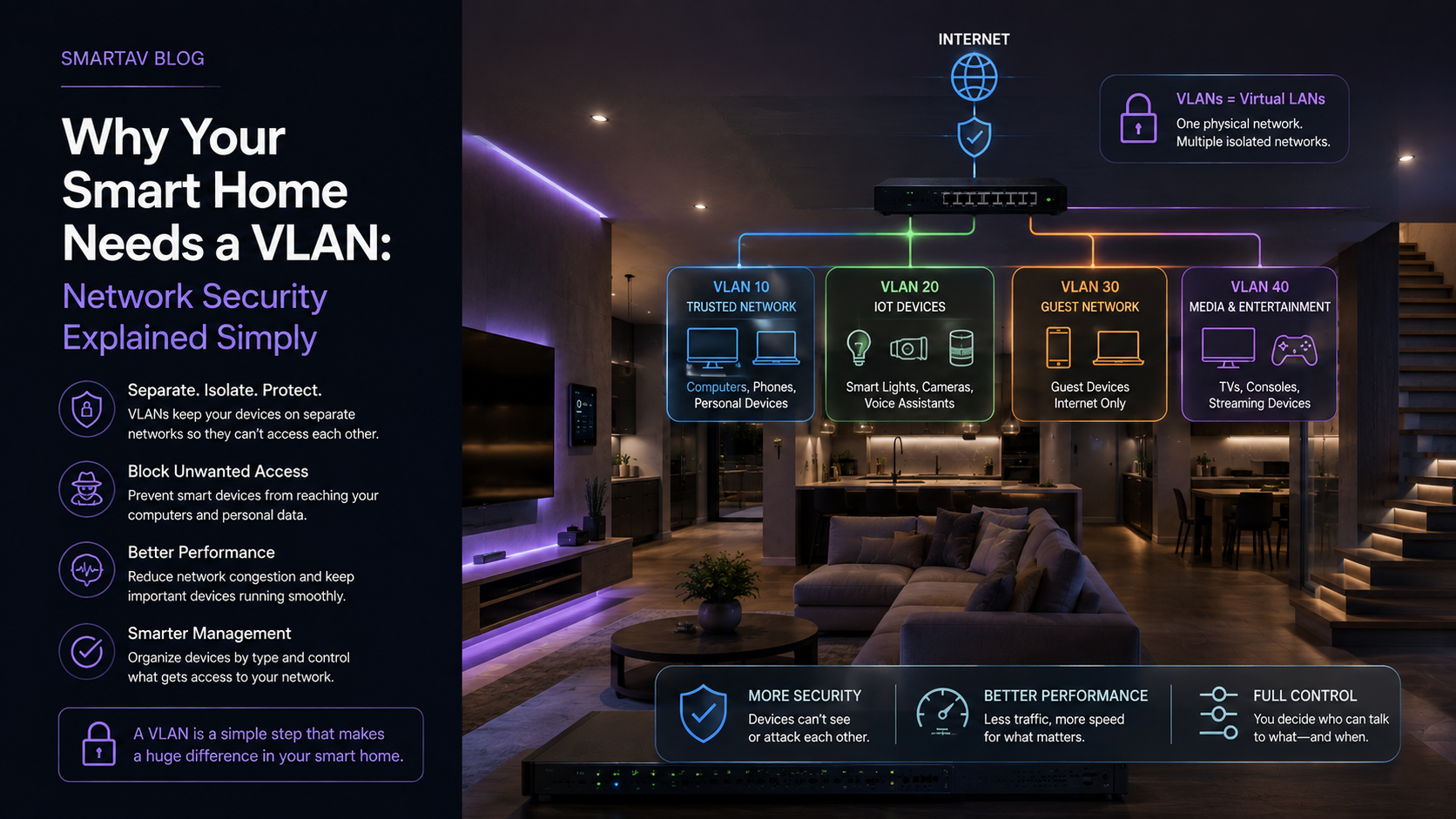
Most homeowners have never heard of a VLAN, and the term sounds more technical than it needs to be. In plain language: it’s the difference between every device in your home sharing one open room, versus each type of device having its own separated space — with clear rules about which spaces can talk to each other. For a smart home with dozens of connected devices, that separation matters more than most people realize.
The Security Risk in Most Home Networks
A standard home network — the kind that comes out of the box with a consumer router — puts every connected device on the same flat network. Your laptop with sensitive financial information, your phone, a $30 smart plug from an unfamiliar brand, and a security camera are all sitting on the same segment, able to communicate directly with each other.
This matters because not all smart home devices are built with the same security standards. Budget IoT devices — inexpensive cameras, sensors, and plugs in particular — have a well-documented history of weak default passwords, infrequent firmware updates, and known vulnerabilities. On a flat network, a compromised device of this kind has direct access to everything else on the network, including the personal devices where sensitive data actually lives.
This isn’t a theoretical risk. Security researchers regularly discover vulnerabilities in budget smart home hardware, and manufacturers vary enormously in how quickly — or whether — they issue fixes. A homeowner has limited ability to vet every device’s security practices before buying it; network segmentation is the practical safeguard that limits the damage regardless of which specific device turns out to have a weakness.
What a VLAN Is (Explained Without Jargon)
A VLAN — virtual local area network — creates logically separated segments on the same physical network infrastructure. Think of it like an apartment building: everyone shares the same building (the physical network), but each unit has its own locked door (a VLAN), and residents can’t simply walk into a neighbour’s apartment just because they share a building.
Extending the analogy slightly further: a VLAN setup can also include a building superintendent’s master key — specific, deliberately configured exceptions that allow certain traffic to cross between segments when there’s a legitimate reason, such as your phone needing to reach your security camera app even though phones and cameras sit on different segments. The default is separation; access between segments is granted selectively, not open by default.
Technically, this is achieved by tagging network traffic so that devices on different VLANs can’t communicate directly unless a rule specifically allows it — even though they’re plugged into the same switch or connected to the same Wi-Fi router’s radio.
How VLANs Protect Your Smart Home
The practical benefit is containment. If a smart camera or budget IoT sensor on its own VLAN is compromised — whether through a vulnerability in the device itself or a breach at the manufacturer’s cloud service — the damage is contained to that segment. The attacker doesn’t get a direct path to your laptop, your phone, or any other device on a separate VLAN, because the network itself blocks that traffic by design.
This containment matters more every year, not less — smart home devices multiply faster than most homeowners realize, and each one is a potential entry point if a manufacturer’s security practices turn out to be weaker than assumed.
→ Related: For the full picture of what a properly designed smart home network includes, see Home Networking for Smart Homes: Why Consumer Routers Aren’t Enough
What to Put on Each VLAN Segment
A typical smart home network segmentation plan separates devices into a handful of logical groups:
| VLAN Segment | Typical Devices |
|---|---|
| Personal devices | Laptops, phones, tablets |
| IoT and automation | Smart plugs, sensors, lighting keypads, thermostats |
| Security | Cameras, NVRs, access control panels |
| Guest | Visitor Wi-Fi access, isolated from all other segments |
| Entertainment | Streaming devices, gaming consoles, smart TVs |
Each segment gets specific rules for what it can and can’t reach — IoT devices, for instance, typically need internet access to function but have no legitimate reason to communicate directly with your personal laptop, so that path is blocked by design rather than left open by default.
SmartAV note: Security cameras and NVRs are one of the most important segments to isolate properly. A camera system that’s been compromised shouldn’t provide a path into the rest of your home network — proper VLAN segmentation is one of the most effective ways to prevent that.
Does This Add Complexity to Daily Use?
This is the question homeowners ask most often, and the honest answer is: not if it’s set up correctly. VLAN segmentation happens at the network infrastructure level — it doesn’t change how you interact with your devices day to day. Your phone still connects to the same Wi-Fi network name, your automation system still controls lighting and climate normally, and streaming devices still work exactly as expected. The segmentation and access rules operate invisibly in the background.
The complexity exists entirely on the configuration side, which is exactly why this is the kind of setup best handled by a professional integrator rather than attempted through consumer router settings not designed for it.
→ Related: For how VLANs fit into the broader Wi-Fi standard picture, see Wi-Fi 6, 6E, and Wi-Fi 7: What They Mean for Your Smart Home
How SmartAV Configures Secure Networks
SmartAV designs VLAN segmentation into every whole-home network we install, separating personal devices, automation and IoT equipment, security systems, and guest access from the start — rather than treating network security as an add-on after the fact.
Frequently Asked Questions
Do I need a VLAN if I only have a few smart home devices?
The security benefit scales with device count, but even a modest number of IoT devices — a handful of cameras and smart plugs — benefits from being isolated from personal devices. It’s more a question of risk tolerance than a strict device-count threshold.
Can I set up VLANs myself with a consumer router?
Some higher-end consumer routers offer basic VLAN or guest network features, but true segmentation with proper rules between segments typically requires managed networking equipment and professional configuration to implement correctly and avoid accidentally blocking legitimate device communication.
Will a VLAN slow down my network?
No — VLAN segmentation doesn’t meaningfully impact network speed. It’s a logical separation of traffic, not a bandwidth restriction, so properly configured VLANs have no noticeable effect on day-to-day performance.
Does VLAN segmentation protect against all security risks?
No single measure eliminates all risk, but network segmentation significantly reduces the potential damage from a compromised device — it’s one important layer among several, alongside strong passwords, regular firmware updates, and choosing reputable device manufacturers.
Is VLAN segmentation only relevant for large or heavily automated homes?
No — the underlying risk (a vulnerable device with direct network access to everything else) applies to any home with even a handful of IoT devices, not just large or fully automated properties. The scale of the network design changes with home size, but the security rationale for segmentation applies broadly.
Build a Secure Smart Home Network
SmartAV designs properly segmented networks for Toronto smart homes, protecting personal devices from the growing number of IoT and automation devices sharing your home network.
Build a secure smart home network →
📞 (416) 904-0504